The portfolio
Applications caught in the act of working
Each video shows a real tool, filmed while it runs, not a mock-up, not an animation. These are applications built for specific needs; video is often the only way to show them, when the client cannot be named.
Some of these applications can be tried directly : See the open demos
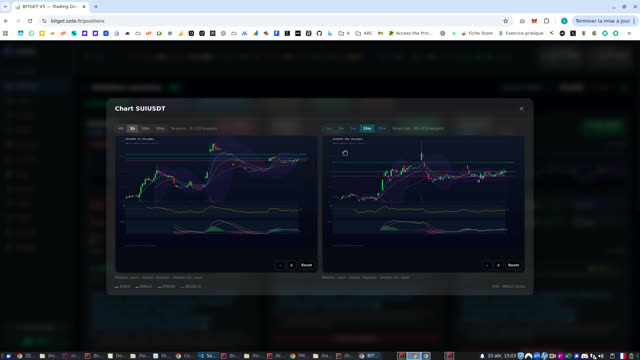
Bitget V5 Trading: Smart Crypto Bot
This Bitget V5 trading bot provides a comprehensive interface for cryptocurrency trading, optimizing decision-making through advanced scanners and AI. Scanner Overview The main interface features a scanner that identifies trading opportunities. For each pair (e.g., RAVEUSDT, SIRENUSDT), it displays: Precise signals (LONG or SHORT). A high confidence level. Optimal entry, Stop Loss (SL), and Take Profit (TP) prices. Trend analysis (e.g., "EMA trend bullish"). : Signals can be filtered by type and by various technical indicators such as "Rebond" (Rebound), "Anticipation", "BB Squeeze", "RSI overbought", and "MACD bullish", allowing for strategy customization. Detailed Charts and Position Management Clicking on a card opens detailed charts with candlesticks and technical indicators like EMAs, MACD, and RSI, adjustable across different timeframes (1m, 3m, 5m, 10m). The "Positions" section allows tracking of open trades, offering card or list views, with real-time P&L, entry prices, SL, and TP. The "Trades" section archives the complete history, including P&L and closure reasons. Performance and System Monitoring The "Activities" page provides a performance summary, including Win Rate, total P&L, and an equity curve. To ensure reliability, the "Status" section monitors: Database connection. Trading agent status. The Guardian for automatic SL/TP. The integrity of Bitget proxies. Advanced Configuration and AI The bot offers configuration options for its scanners, enabling strategies like "Momentum Scalp", "Reversal (Supertrend / EMA / RSI)", "Breakout (Squeeze + Volume + ATR)". The "CryptoDB" section ensures the freshness of candle data. Furthermore, "AI Tests" validate connections to artificial intelligence models (Gemini, Vertex) essential for automated decision-making, complemented by detailed logs for precise monitoring.
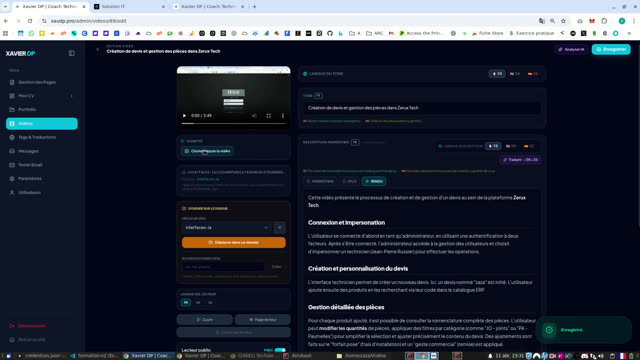
Video library: upload, AI analysis, multilingual texts & thumbnails
What this video shows A real screen capture of our admin: we showcase our own multimedia / video library tool, not the business app visible in the background, which is only incidental demo content in the browser. What the tool does Video file upload into a centralized media library. AI-assisted analysis to suggest titles, descriptions, and tags. Multilingual editing (French, English, Spanish) for titles and descriptions to power the website and public portfolio. Thumbnail / poster management: pick the cover frame and fine-tune positioning for crisp cards and the player. Folders, filters, and tags, grid/list views, portfolio and player toggles to control public exposure. Why it matters One place to catalog, enrich, and publish videos with less manual typing while staying in control of copy and imagery.
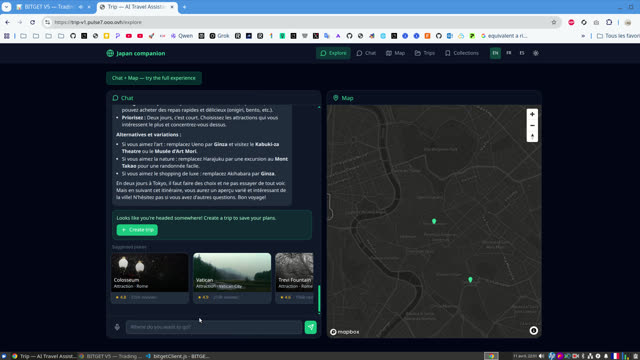
AI Travel Assistant: Itinerary Planning and Interactive Map
Intelligent Travel Assistance Platform This video showcases an innovative web platform that functions as an AI-powered travel assistant. It enables users to easily plan trips by generating detailed itineraries, suggesting places, and offering practical advice. Personalized Itinerary Planning Users can initiate planning by specifying a destination and duration, such as a "medium trip to Japan (1-2 weeks)" or "two days in Tokyo". The AI then provides activities, logistical tips, and itinerary variations. Flexibility is key to creating a tailored travel experience. Interactive Exploration with Maps and Attractions The platform integrates an interactive map where suggested locations are pinned, offering a clear visualization of the itinerary. For each attraction, details like overviews, photos, and location information are available. We see a transition from planning a trip to Japan to exploring attractions in Rome (Trevi Fountain, Colosseum, Vatican), demonstrating the tool's ability to handle diverse destinations. Additional Features The interface also offers options to save trips ("Create trip"), explore collections, and change the language. A voice chat module is present, although not fully utilized in this demo. The focus is on a smooth and information-rich user experience to simplify trip organization.
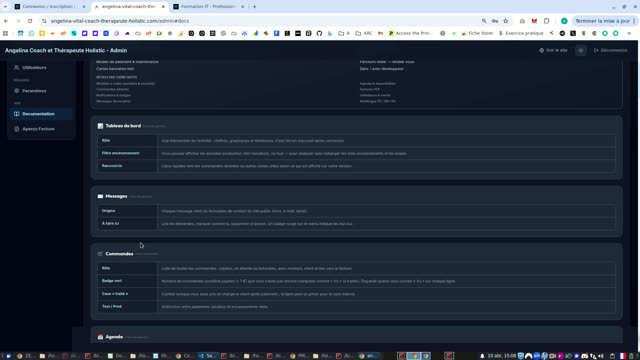
Comprehensive Holistic Therapist Website Management
Public Site Navigation & Online Booking: The website showcases Angelina Vital's holistic profiling services. Visitors can easily navigate through the "Home", "About", "Services", "Pricing", and "Contact" sections. The online booking process is seamless and comprehensive: Selection of a service from the available options (free or paid). Choosing an open time slot from the integrated calendar. Filling in personal information (name, address, email, phone) via a secure form. Confirmation and payment step, even for €0 services, ensuring clear client tracking. Admin Panel Access & Features: The administrator can log into a secure private area. The dashboard provides a comprehensive overview of activity, including messages, orders, and general statistics. Content and Communication Management: Messages: A centralized inbox for messages sent via the site's contact form. Orders & Calendar: Detailed tracking of appointments and management of calendar availability, with options to view slots by day or week. Services: Configuration of offered services, including pricing (€0 or €60), activation/deactivation, and modification of each service's details. CMS / Texts: An intuitive content editor allows customization of texts for different website sections (Brand, About, Services, Contact, Footer, Meta SEO) in multiple languages (FR, EN, ES). Social media links like Instagram can also be managed. Email Templates: Advanced customization of automated email templates sent to clients and administrators (contact confirmations, order confirmations, appointment reminders) with a live preview. Advanced Administration: Users: Comprehensive management of client and administrator accounts, with creation, modification, and deactivation options. Settings: Configuration of general business information, security settings, maintenance mode, legal notices, and payment options (test and production modes). Documentation: A dedicated section provides a detailed user guide for all admin panel features, including technical explanations. Invoice Preview: Generation and preview of PDF invoices, clearly displaying client details, service description, payment information, and company contact details.
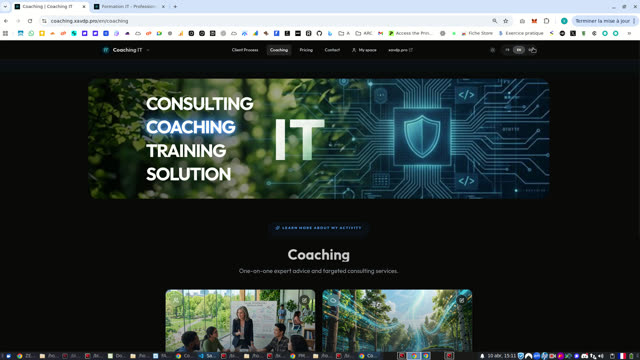
CMS and Administration for Multinational IT Expert
Website Presentation Discover a professional website designed for an IT expert. It offers a variety of services: Training, Coaching, Consulting, and Custom IT Solutions. Navigation is intuitive, with appointment booking options (free discovery call, preliminary audit) and direct contact via WhatsApp. The site is fully multilingual (FR, EN, ES) for international reach. Client Features Users can easily explore detailed support processes for each service (e.g., the 4 steps of client coaching). An integrated calendar allows booking time slots. An advanced contact page offers the possibility to send text, audio, or video messages, as well as documents. Comprehensive Admin Panel The CMS provides a dashboard to track sales and invoices by service type. Manage SEO and real-time traffic, homepage content, and offer listings (training, coaching, etc.) with detailed descriptions, visuals, and video integration. Organize schedules, manage clients, track projects with a Kanban module, and communicate via an integrated client messaging system with audio/video transcription. The invoicing system allows generating custom quotes and invoices, while the glossary and pricing management optimize content and price publication. Advanced settings include user management, payment gateway configuration (Stripe, Revolut), and customization of contact information and multilingual introduction texts.
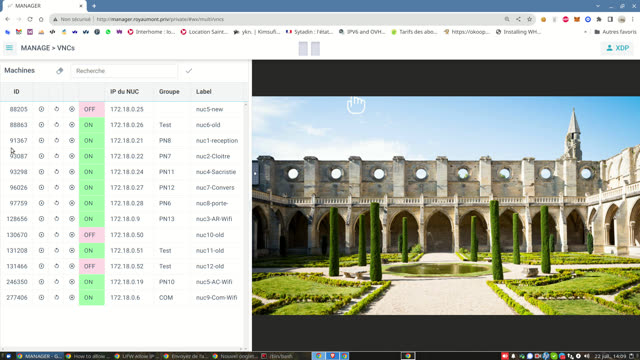
MANAGER: Machines, Groups, Users, and VNCs
This video tutorial presents the MANAGER administration interface, exploring its key functionalities for IT fleet management. Machine Management The Machines section displays a detailed list of devices (NUCs) with their status (ON/OFF), IP address, MAC address, last ping, socket IP, assigned group, and label. This provides a quick overview of all equipment. Group and Action Management Groups allow structuring machines and associating scheduled actions with them. The video shows the ability to define actions like 'Start' or 'URL' with specific timings, and the flexibility to organize these actions via drag-and-drop. User Management The Users section lists accounts with their ID, name, first name, email, group memberships, and 'Active' status, simplifying access administration. Integrated VNC Access Finally, the VNCs section integrates a VNC client, allowing direct connection and interaction with remote machines, displaying a real-time view of their screen. The tutorial illustrates connecting and quickly changing a machine's group.
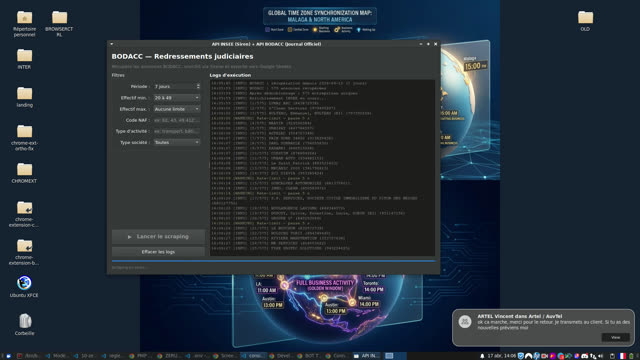
BODACC Scraper to Google Sheets
Automated BODACC Data Collection This video showcases an application designed for the automated collection of judicial recovery announcements published on the Official Bulletin of Civil and Commercial Announcements (BODACC). The tool extracts key information and exports it directly to a Google Sheet. Precise Announcement Filtering The application provides detailed filters to target relevant data. Users can specify the period of search (e.g., 7 days), workforce size (e.g., 20 to 49 employees), NACE code (economic activities like transport, construction), and company type (all). Extraction Process and Logging Once the filters are defined, the user initiates the scraping process. The "Execution logs" section displays the real-time progress, including the number of identified companies, details of each announcement (SIREN number, company name, etc.), and pauses due to rate limiting. Data Export and Visualization The collected data is then organized and automatically exported into a Google Sheets spreadsheet. This structured sheet contains columns such as company name, SIREN number, publication date, procedure type, NACE code, workforce, legal form, city, and postal code, allowing for easy analysis and efficient information management.
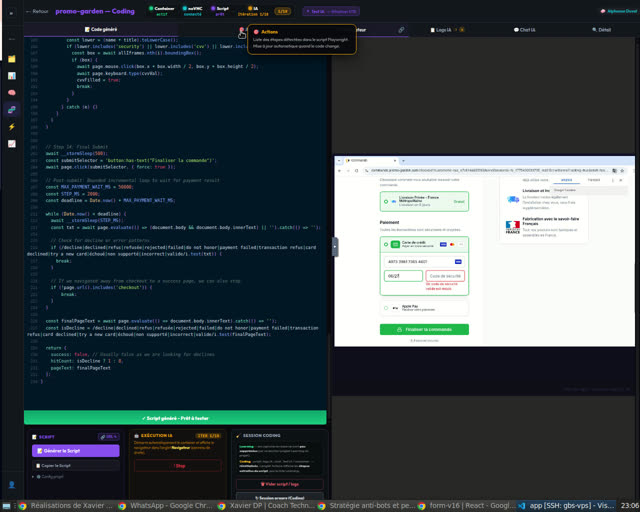
AI Payment Form Pentesting Tool
Customer Journey Capture The process begins with the autonomous learning of a checkout flow on the "promo-garden" website. The Navigather agent navigates through the checkout steps, automatically filling in contact, shipping, and payment information. This "learning" phase is crucial for modeling user behavior and capturing key interactions. Failure Scenario Simulation The objective of this learning exercise is to simulate a credit card decline scenario. The agent is configured to attempt a transaction that will intentionally fail, thereby validating the system's payment error handling. Once the card decline is detected, the learning process is considered complete. Script Generation and Execution Following the learning phase, an automated script is automatically generated. This script contains all recorded actions, ready for replay. The video then demonstrates the execution of this script by several virtual agents (Josephine Boutin, William Tanguy, Étienne Delmas) who reproduce the same checkout journey and encounter the same payment decline, confirming the robustness of the failure scenario.
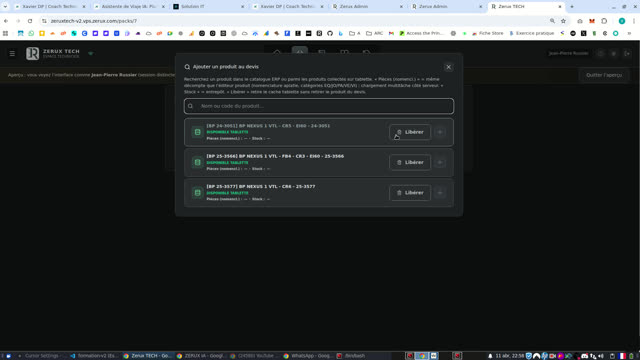
Creating and Managing Repair Quotes
This video demonstrates the process of creating and managing repair quotes within the Zerux Tech application. Login and Quote Initiation The user begins by logging in as an administrator, then accesses a technician's interface. From there, they navigate to the quotes section and initiate a new quote by assigning it a name. Adding Products and Parts Products are added to the quote either by selecting them from a list of available tablet products or by performing a search in the ERP catalog. Once a product is added, the user can access its bill of materials (nomenclature) to select specific parts required for the repair, using category filters if needed. Quantities for each part can be adjusted. Quote Finalization and Generation After adding all products and parts, the technician can enter flat-rate installation fees and apply a commercial gesture (discount). Next, they complete client information, add technical comments, and digitally sign the quote. Once finalized, the quote is saved and can be generated as a PDF document.
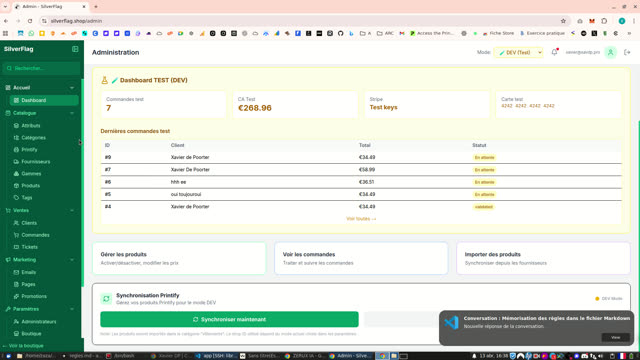
Comprehensive E-commerce Store Management
Full E-commerce Solution Demonstration This video showcases an end-to-end e-commerce solution, featuring a robust administration interface and a smooth customer experience. Discover how to easily manage your online store. Simplified Administration The admin dashboard provides an overview of key activities: active products, registered customers, and recent orders. You can navigate through various sections like the catalog (attributes, categories, products, tags), suppliers (Printify integration), and sales (customers, orders, tickets). Product management is detailed, showing customization of images, variations, supplier information, and SEO. Order Management and Marketing Order tracking is intuitive, allowing you to view details and change order statuses (pending, refused, accepted, validated, shipped, delivered, canceled). The Marketing section includes managing transactional emails (welcome, order confirmation, payment failed, forgot password) with customizable previews, as well as page and promotion management. Advanced Settings and Payment Testing Configure your store with detailed settings for branding, company information, contacts, social networks, and SEO. The platform supports a DEV (Test) and PROD (Live) mode for Stripe transactions, including the ability to securely test payments. A dedicated section for VAT by country ensures tax compliance.
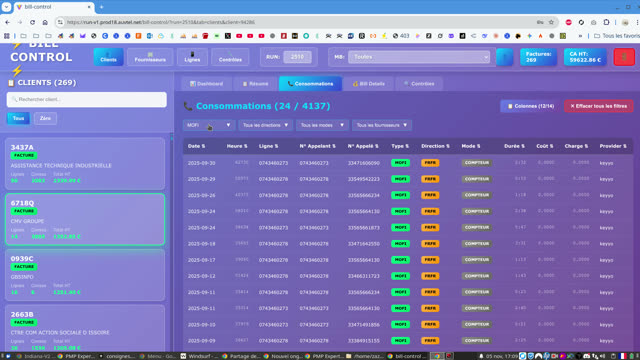
BILL CONTROL - Customer, Supplier, and Line Billing Management
General Overview This video introduces BILL CONTROL, a web platform dedicated to billing management. It allows users to centralize and analyze billing data for customers, suppliers, and phone or internet lines. Customer Management Access a detailed client dashboard, including a summary of consumption and billing information. The "Consommations" and "Bill Details" tabs offer a granular view of calls, with filtering options by type, direction, mode, and provider. The "Contrôles" section allows for checking the quality of billing data, detecting anomalies such as incorrectly tagged phone numbers. Supplier Management The "Fournisseurs" tab displays a list of suppliers with global and individual statistics on consumption and costs. A specific dashboard for each supplier provides aggregated information on call types, directions, and billing modes, as well as top clients. Line Management The "Lignes" section allows viewing the status (active, deactivated, etc.), type (ADSL, FIBRE, MOBILE, etc.), and number of each line. Detailed information such as activation/deactivation dates, history, and SIM data are accessible for each line. Quality Control Administration The "Contrôles" interface offers the ability to view, modify, and add custom quality controls based on SQL queries. This ensures the integrity and compliance of billing data.
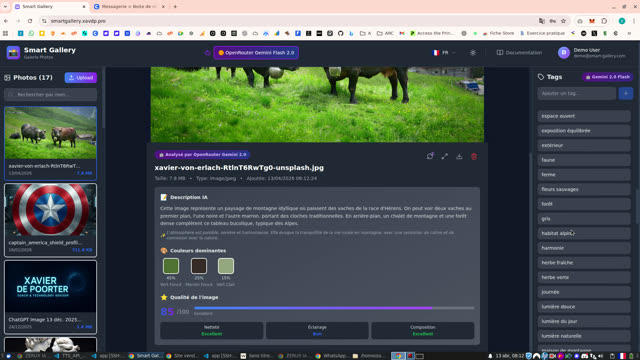
Smart Photo Gallery with AI
This tutorial showcases a smart photo gallery application that leverages artificial intelligence for image management. Key Features Secure Login: The user logs in via a demo account to access their photos. AI Image Analysis: Each photo is automatically analyzed by the AI (OpenRouter Gemini 2.0). Description Generation: The AI creates a detailed textual description for each image. Dominant Color Identification: The application detects and displays the predominant colors in the image. Image Quality Assessment: A quality score is assigned, with indicators for sharpness, lighting, and composition. Automatic Tagging: A comprehensive list of relevant keywords is generated, enabling easy organization and search. These tags can be manually edited or deleted. Photo Management: Ability to upload new images and delete existing ones. Upload Process The upload process is demonstrated step-by-step: File Upload Initial Analysis Processing by AI to generate description and tags Saving of enriched data Finalization : The tool offers a complete solution for intelligent management and organization of photo collections.
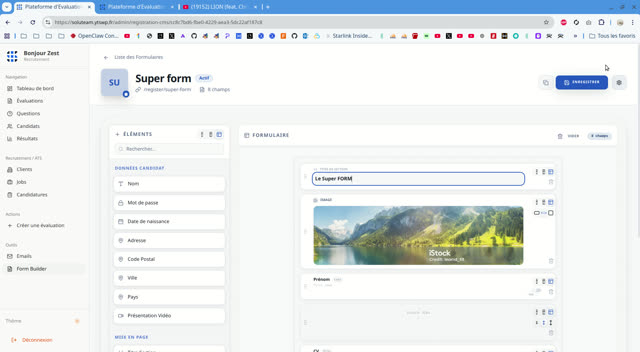
Candidate Registration Form Builder
Overview of the Form Builder This tutorial showcases SoluTeam's powerful form builder, an intuitive solution designed for creating and customizing candidate registration forms. It highlights the simplicity of the interface, making the design process accessible to all administrators. Adding and Configuring Elements The creation process is based on drag-and-drop functionality for a variety of elements, including: Fields for candidate data (Last Name, First Name, Email, Phone, Address, etc.) Layout elements (Section Titles, Rich Text, Separators, Empty Spaces) Files (CV) Multimedia content (Customizable images with integrated cropping, YouTube/Vimeo videos). Each element can be individually adjusted, with options to make fields required or modify their position and alignment for optimal presentation. Dynamic Layout and Preview The video demonstrates layout flexibility, allowing fields to be placed side-by-side for a compact and clear form. All changes are saved in real-time, and an instant preview feature is available to check the form's appearance as it will be presented to candidates. This ensures a smooth and efficient experience from form design to publication.
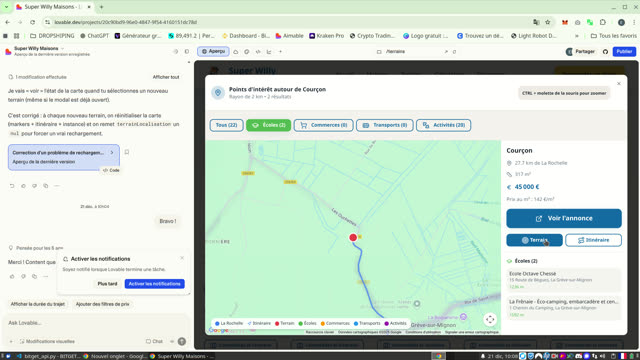
Super Willy Plot Comparator
This screencast showcases the user interface of Super Willy, a plot comparator for house construction. Plot Selection and Viewing The application allows users to browse a list of available plots, with sorting options by price, surface area, and distance. Each plot listing displays key information such as location, distance from La Rochelle, surface area, and price per square meter. Interactive Map and Points of Interest Upon selecting a plot, an interactive map appears, showing relevant points of interest (POI) in the vicinity. POIs are categorized into schools, shops, transportation, and activities. Users can: Display the route between La Rochelle and the plot. Filter POIs by category for a targeted search (e.g., view only schools). Zoom in on the map to explore neighborhood details and the exact location of POIs. Access to Detailed Listings A "View listing" button allows users to access the detailed plot advertisement on an external platform (etreproprio.com). This feature provides a comprehensive overview of the property before contacting the agency.
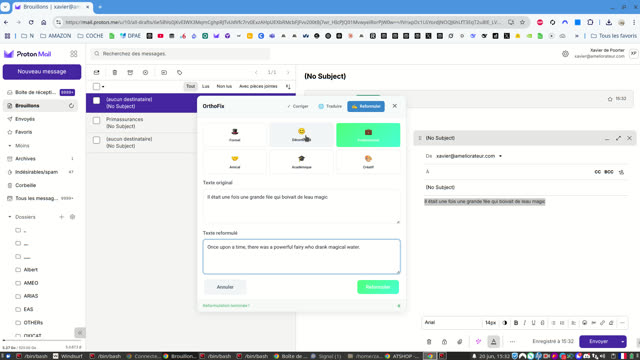
OrthoFix: Text Correction, Translation, and Rephrasing
OrthoFix: Your Integrated Linguistic Assistant OrthoFix is a powerful browser extension that helps you perfect your writing directly within your browser. Designed for seamless integration with platforms like Proton Mail, it offers a comprehensive suite of linguistic tools to enhance the quality of your communication. Grammar and Spelling Correction Say goodbye to typos and grammatical errors. OrthoFix analyzes your text in real-time, identifies mistakes, and suggests relevant corrections. It transforms sentences like "Il était une fois une grande fée qui boivait de leau magic" into "Il était une fois une grande fée qui buvait de l'eau magique," ensuring impeccable clarity and accuracy. Instant Translation Need to quickly translate a passage? OrthoFix supports multiple languages. Simply select the text and choose your target language (English, Spanish, Italian, German, Portuguese, etc.) to get an accurate translation. For example, the original French sentence is translated into Spanish as "Érase una vez un hada grande que bebía agua mágica." Advanced Rephrasing Add style and nuance to your writing with OrthoFix's rephrasing feature. Choose from several styles to adapt the tone of your message: Professional: For a formal and concise discourse. Casual: For a lighter, more friendly tone. Friendly: For a warm and personal touch. Formal: For sophisticated expression. Get variations such as "Once upon a time, there was a powerful fairy who drank magical water" (professional) or "Il était une fois une merveilleuse grande fée qui savourait de l'eau enchantée" (friendly). : With OrthoFix, write with confidence, translate with precision, and express yourself with elegance, all without leaving your messaging or writing application.